

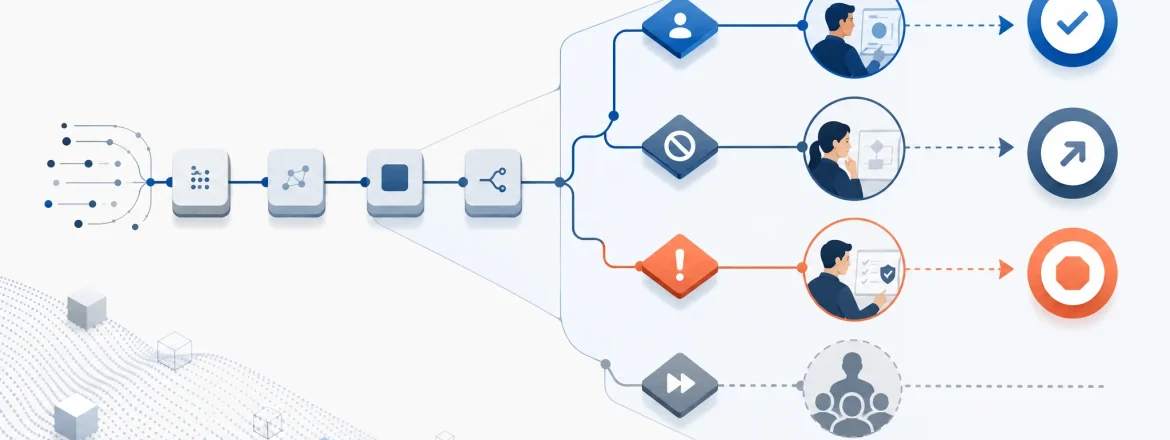
Human review in AI workflows should be a control with explicit boundaries—not a default “approve everything” layer. The practical rule: automate routine, escalate decisions that change outcomes, and stop when authority or context is missing.
When teams first add humans to an AI workflow, they often start with a good instinct: “Let’s add safety.” But in production, safety is not created by a human checkbox. Safety and governance come from decision rights, clear stop conditions, and review paths that actually change what happens next.
This guide gives you a decision-ready taxonomy and a step-by-step approach for building human review in AI workflows that is understandable, auditable, and operationally sustainable.
The short answer (use this rule in design reviews)
Human review in AI workflows should only be used when human judgment can change an outcome. If it can’t, automate. If authority is missing, stop.
- Decide: the human selects an option and owns the outcome.
- Escalate: the workflow routes the case to a person with the right expertise/authority.
- Stop: the workflow halts because it can’t proceed safely, or it isn’t permitted.
- Review: validating a step only matters if it changes the decision path.
Quick rule: If human judgment does not change the outcome (or side effect), don’t add a review gate. Use review to route, override, or block—otherwise it becomes queue time.

What “human review in AI workflows” really means (definition)
Human review in AI workflows is a deliberate control at a specific decision point that routes a case to a person when human judgment can change the next action (or when proceeding is not permitted without human authority).
Operationally, “review” is often misunderstood as a broad bucket. In real workflows, though, review is narrower and more specific:
- Is the system allowed to do this?
- Is the action correct given the context?
- Should a person with authority handle it instead?
- Should the workflow stop until missing context is resolved?
That is why human review in AI workflows should be attached to decision rights. If a reviewer can only “approve what the system already committed to,” the workflow doesn’t have oversight—it has latency.
Why the decision boundary matters more than the presence of a human
Review volume is not the same as review value. A human can review a thousand cases and still provide little control if the workflow boundary is too broad or too vague.
In practice, teams see two common failure modes:
- Review theater: the workflow creates a manual queue for low-risk routine work. Humans approve what the system already could have done safely.
- Vague escalation: the pipeline is mostly automated, but escalation is unclear. When the real edge cases arrive, the workflow doesn’t route to the right authority fast enough.
The goal is not to remove humans. The goal is to put humans where judgment changes outcomes and stop where safety or policy requires it.
Decision taxonomy: classify the step before you place the reviewer
Before you decide where human review belongs, classify what kind of decision the step represents. Different decision types need different default controls.
In human review in AI workflows, it’s useful to separate steps into four decision categories:
- Classification decision (what bucket/label/routing?)
- Side-effect decision (what external action is triggered?)
- Policy-sensitive action (allowed/not allowed under governance/regulation?)
- Uncertain or incomplete case (missing context/confidence too low to proceed safely?)
| Decision type | What it is | Default control | When human review helps | When to escalate or stop |
|---|---|---|---|---|
| Classification decision | The system decides what something is, which bucket it belongs in, or how it should be routed. | Automate by default | When the label materially changes downstream behavior. | Escalate when the label affects permissions, money, customer impact, or legal exposure. |
| Side-effect decision | The system triggers an external effect (send message, change record, issue refund, start action). | Escalate or stop for high-impact cases | When the action is hard to undo, externally visible, or expensive to correct. | Stop if irreversible, policy-sensitive, or outside authority. |
| Policy-sensitive action | Correctness is not enough—whether the action is allowed under policy/governance/regulation matters. | Escalate to a human with authority | When policy intent is clear and authority exists. | Stop when policy is unclear, authority is missing, or the case falls outside allowed boundaries. |
| Uncertain or incomplete case | The system lacks confidence, context, or reliable signals to proceed safely. | Escalate or stop | When a human can supply missing context or decide using additional information. | Stop if the workflow cannot safely proceed even with review. |
This taxonomy is intentionally practical. It gives stakeholders a shared vocabulary so “add review” becomes “add the right control at the right decision point.”
A decision tree you can actually use
Human review in AI workflows becomes consistent when the decision tree is explicit.
- Is the step low-risk routine work?
- Yes: automate it.
- No: continue.
- Is it a classification decision?
- Does the label materially change downstream behavior?
- Yes: review or escalate.
- No: automate it.
- Does the label materially change downstream behavior?
- Is it a side-effect decision?
- Is the action irreversible, externally visible, or hard to undo?
- Yes: escalate or stop.
- No: automate with logging and reversible handling where possible.
- Is the action irreversible, externally visible, or hard to undo?
- Is it policy-sensitive?
- Is policy clear and right authority available?
- Yes: escalate to that authority.
- No: stop.
- Is policy clear and right authority available?
- Is the system uncertain or missing context?
- Yes: escalate or stop.

Four control verbs: decide, escalate, stop, and review
Human review in AI workflows becomes understandable when you separate the control verbs.
Teams often blur these actions, which causes accountability issues:
- Decide: a human selects among options and owns the outcome.
- Escalate: the workflow routes a case to someone with the right authority or expertise.
- Stop: the workflow halts because proceeding would be too risky, too uncertain, or not permitted.
- Review: a human checks/validates/approves, but the review only matters when it changes the decision path.
If reviewers cannot do the thing the verb implies—decide, stop, or escalate—then you need to redesign the workflow gates.
Why blanket approval usually fails
Blanket approval fails because it makes queue volume the default control. A review gate helps only when it changes an outcome, side effect, or policy-sensitive action.
When teams apply review to low-risk routine steps, three predictable problems show up:
- Queues become the default control. Review volume grows because the boundary is too broad, not because the workflow is truly risky.
- Decision rights get muddy. If the reviewer is rubber-stamping what the system already decided, the review layer becomes a second interface on the same decision.
- Risk gets mistaken for friction. “Human present” is not the same as “human decision.” A reviewer approving a delay doesn’t improve the underlying control.
Blanket approval is especially weak in workflows that mix output checking and action taking. For example, approving a draft email is different from approving a refund or a deletion.
If you’re thinking about autonomy and where decision rights belong in the broader system design, this framing connects with agent autonomy boundaries for decide, escalate, stop, review and agentic AI operating model and decision rights.
Three review models (and what they optimize for)
Not all “human-in-the-loop” designs behave the same. Teams tend to adopt one of three patterns when adding human review in AI workflows.
1) Always-on manual approval
What it optimizes for: simplicity and perceived control.
Where it fails: it turns review into a bottleneck when most steps are low-risk routine work.
Always-on approval can be appropriate for narrow, high-stakes paths where every action is inherently sensitive. But if your workflow mostly processes routine cases, this design wastes the most expensive part of your process: human attention.
2) Full automation with post-hoc review
What it optimizes for: speed.
Where it fails: if the action is irreversible, externally visible, or policy-sensitive, post-hoc review cannot prevent harm—it only detects it after the fact.
Post-hoc review can still be valuable for audit and learning, but it should not be treated as a control substitute for stopping or escalation when prevention is required.
3) Ad hoc escalation
What it optimizes for: flexibility.
Where it fails: inconsistent decisions and weak auditability.
Ad hoc escalation typically works only in small teams with shared context. As volume increases or ownership changes, escalation logic “lives in people’s heads,” which makes it hard to audit and hard to scale.
The better pattern: decision-based review
The more durable pattern is decision-based review. Automate routine steps and reserve human ownership for decisions where judgment changes the outcome.
That usually means:
- fewer blanket approval points,
- more explicit escalation rules,
- clear stop conditions for risky or uncertain cases,
- and reviewers who can take meaningful actions (not just approve default paths).
| Review model | Optimizes for | Where it fails | Typical symptom |
|---|---|---|---|
| Always-on manual approval | Simplicity and perceived control | Low-risk work becomes a bottleneck | Long queues, reviewer fatigue |
| Full automation with post-hoc review | Speed | Irreversible/policy-sensitive actions already committed | Review becomes forensic only |
| Ad hoc escalation | Flexibility | Inconsistent decisions and weak auditability | Escalation rules live in people’s heads |
| Decision-based review | Controlled autonomy | Requires careful boundary design | Exceptions are intentional |
Escalation paths make review real
A review point without an escalation path is just a waiting room.
Escalation and stop conditions should be paired with routing rules. Otherwise, the workflow stops being a control system and becomes a queue system.
What escalation should do
Escalation moves a case out of the automated path and to a person who can make the necessary decision.
That person needs three things:
- Context: the information required to understand the case.
- Authority: permission to decide and act.
- Action capability: ability to do something other than approve the default path.
If any of these are missing, the escalation path is incomplete and the “human review” gate becomes a stall.
Good escalation triggers are explicit
Good triggers are not vague feelings about risk. They are concrete conditions in the workflow.
- low confidence
- missing required information
- unusual input patterns
- high-impact side effects
- policy-sensitive action
- failure to classify the step cleanly
The exact trigger list varies by organization, but the logic should be consistent. Consistency is what makes escalation auditable and predictable.
Escalation and stop are not the same thing
- Escalation: a human can take over and make a decision.
- Stop: the workflow should not proceed until someone resolves the issue, or until a different process handles it.
Many teams accidentally collapse these controls into one review queue. That’s a design mistake: some cases need a decision owner; some need a halt; some need both.
When a stop condition is the right answer
Stop conditions are correct when proceeding would be too risky, too uncertain, or not permitted.
A useful stop condition should:
- prevent the system from silently continuing when it should not,
- record why the workflow stopped,
- and create a path for resolution (or diversion to a different workflow).
If a workflow stops but nobody knows who owns resolution, then the stop condition is incomplete. It interrupts work, but it doesn’t govern it.

The reviewer must own the decision, not just the checkbox
If the human can only click approve what the system already committed to, oversight is not meaningful.
For human review in AI workflows to work as a control, the reviewer needs:
- enough context to decide correctly under real conditions,
- enough authority to change the decision path, and
- workflow-supported information (not just a single model output field).
For example, a reviewer may need to see:
- original input (or a human-meaningful summary)
- model output
- confidence/uncertainty signal (or a proxy)
- reason the case escalated
- relevant policy/rule identifiers
- the downstream effect of each decision option
If the reviewer only sees a green button and one field, the workflow may be “human-labeled,” but it is not “human-owned.”
Authority and context form a pair
Authority without context is guesswork. Context without authority is theater.
One simple way to design reviewers is to pair decision domains with the access they need to take action.
| Decision about | Reviewer role (example) | Access they need | Actions they must be able to take |
|---|---|---|---|
| Customer support routing | Support lead or trained specialist | Ticket history, customer context, routing/policy rules | Reassign, draft response, or stop an action that requires ownership |
| Refunds or credits | Finance or support owner with limits | Transaction details, refund policy, relevant risk signals | Approve, deny, or route for manual handling |
| Policy-sensitive content | Policy owner or content moderator | Policy text, content context, escalation reason | Approve, remove, escalate, or stop publication |
| Security or account recovery | Security-trained reviewer | Identity signals, account history, risk indicators | Verify, block, or require another verification channel |
| Contract or legal-adjacent work | Legal or delegated reviewer | Document context, clause history, policy boundaries | Escalate, approve, or send to formal legal review |
Notice what’s missing from this table: “approve a default path.” Reviewers should be assigned to decisions, not just to review clicks.
If you’re aligning this with production architecture (where the control plane decides and the agent acts), see control plane versus agent loop for safe, auditable systems and the agent loop thinks, the control plane decides.
Design human review in AI workflows step by step
You can implement human review in AI workflows without turning everything into a manual queue. Use this workflow-design sequence.
Step 1: Map the workflow end to end (as it runs)
Write down every step the system takes, including “helper” steps and downstream services that trigger real actions. Many review failures start because a side effect is hidden behind an implementation detail.
Design output: a complete, operational workflow map (inputs → model decisions → actions → external effects).
Step 2: Label each step by decision type
For each step, classify it as:
- classification decision
- side-effect decision
- policy-sensitive action
- uncertain or incomplete case
This gives you the starting point for the right review boundary. It also makes debates concrete: you can ask “which decision type needs a human?” rather than “is this risky?”
Step 3: Choose the default control for each label
Rule of thumb:
- Routine classification: automate by default.
- Side effects: escalate or stop for high-impact/irreversible actions.
- Policy-sensitive actions: escalate to authorized humans or stop if policy/authority is unclear.
- Uncertainty: escalate or stop depending on whether missing context can be supplied.
Do not use the same gate for every label. When you treat all decisions as equal, you either overload humans or leave gaps.
Step 4: Define triggers for leaving the automated path
Make triggers explicit and operational. Examples of triggers include:
- confidence or uncertainty thresholds
- missing required fields
- policy flags
- unusual or out-of-distribution input patterns
- failure to classify into supported buckets
What matters most is consistency: identical triggers should produce identical routing behavior.
Step 5: Define who owns the escalation
Escalation ownership should match the decision domain. A generic “review team” often creates delays and inconsistent outcomes.
Design output: a routing map from decision type + trigger to reviewer role/queue.
Step 6: Define the stop condition and fallback
Not every exception should be escalated. Sometimes the correct control is to stop and route to another workflow (or request additional information first).
For stop conditions, ensure you have:
- a reason recorded for why the workflow halted
- a defined resolution path
- clear expectations for who resolves the missing context
Step 7: Capture the reason for review (reason codes)
Every escalated or stopped case should carry:
- a short reason code (why the boundary was triggered)
- a brief explanation suitable for audit
- the key artifacts (input summary, model output, and relevant policy/rule identifiers)
Without reason codes, all review volume looks the same. With reason codes, you can identify operational noise vs genuine exceptions.
Step 8: Measure the live process and tune the boundary
Human review in AI workflows is an operational control, so it needs measurement. After launch, instrument signals that show whether your boundary is helping.
If you’re building evaluation around workflow behavior and drift, connect this to building an agent eval harness that survives workflow drift.
What human review should check—and what it should not replace
Human review should check the parts humans are good at: judgment under context, policy interpretation, and exception handling.
It should not try to replace what the system can reliably do with deterministic checks and workflow enforcement.
Review should check for these things
- Is the classification consistent with the input and relevant policy?
- Does the output create an external effect that must be reviewed before action?
- Is the action permitted under governance/policy constraints?
- Does the reviewer have enough context to decide?
- Is the case unusual enough that the model may not be a safe default decision-maker?
Review should not try to replace these things
- routine low-risk execution steps
- obvious routing decisions that do not change outcomes
- mechanically verifiable checks that can be validated in code/workflow
- policy enforcement that should already be codified in the workflow
When review tries to do everything, it becomes expensive and inconsistent. When review is narrowly focused, it becomes a strong, auditable control.
Mixed-risk workflow examples (how the taxonomy behaves)
The fastest way to understand human review in AI workflows is to apply the taxonomy across realistic scenarios.
Example 1: Customer support triage (bounded workflow)
Consider an AI system that receives support tickets, categorizes them, drafts a reply, and can trigger a refund.
- Ticket category is a classification decision. If it only affects internal routing, you can automate by default. If it changes permissions or escalation level, apply review/escalation.
- Draft reply is often a routine step if it’s bounded and doesn’t create an irreversible external effect. You might keep it automated, or route it for light review when policy requires a human sign-off.
- Refund is a side-effect decision. Because it affects money and is hard to reverse, it usually needs an escalation path to a finance/support owner or a stop condition when authority is missing.
This is the kind of bounded workflow that can be designed intentionally rather than turning everything into an autonomous agent. See AI support triage as a bounded workflow, not an autonomous agent.
Example 2: Account recovery (classification is not the hard part)
Account recovery can look simple at the UI level, but it can be high risk in practice.
A system may verify some signals, classify the request as “likely legitimate,” and then initiate a password reset or access change.
- The classification may be the easy part.
- The side-effect (access change) is where risk concentrates.
So in human review in AI workflows, the key design question is often not “should we review the classification?” but “do we escalate/stop before granting access when confidence is low, the account is sensitive, or the pattern is unusual?”
Example 3: Content publication (draft vs publish)
Suppose an AI drafts content for an external-facing message, article, or announcement.
- The draft itself is not always the risky part.
- Publishing is the moment where governance, reputation, and policy constraints matter.
In this case, the workflow may allow automation for drafting, but require escalation or stop for publication if policy/legal sensitivity or reputational risk is present.
Review here is not about whether the AI can write a sentence. It is about whether your organization should publish the content at all.
Example 4: Operational changes (reversibility and visibility)
Consider a workflow that can change infrastructure, alter records, or trigger downstream operational actions.
- If the action is reversible and low impact, logging plus automated execution may be sufficient.
- If the action is hard to undo or visible to customers, escalation is usually needed.
- If the action is policy-sensitive or could cause significant failure, stop until a human approves with clear decision authority.
This is why human review in AI workflows should be designed alongside the control plane—not bolted on after the workflow already acts.
Operational metrics tell you whether the review boundary is working
Without measurement, “human review” is a promise, not a control.
Even without a benchmark dataset, you can run an instrumentation plan that answers: “Is our review boundary productive?”
| Metric | What it tells you | What a problem may look like |
|---|---|---|
| Review queue volume | Whether the review boundary is too broad | Queues grow even though many cases are routine |
| Override rate | How often reviewers change the automated path | Reviewers repeatedly reverse or correct default decisions |
| Escalation rate | How often cases leave automation | Escalation happens more often than expected for normal traffic |
| Time to decision | Whether review slows the workflow in practice | Cases sit too long for business needs |
| Incident count by step | Where controls correlate with failures | The same workflow step keeps showing up in incident reports |
| Stop rate | How often the workflow halts appropriately | Stops are either too frequent or too rare relative to risk level |
Important: these are operational signals, not proof of absolute “safety.” But they help you detect boundary issues.
- Low queue + high incident rate can imply the boundary is too loose.
- High queue + few overrides can imply the boundary is too broad (review theater).
Over time, you tune your triggers and routing rules based on observed behavior and reviewer outcomes.
What success looks like in production (qualitatively)
Human review in AI workflows succeeds when the workflow is legible and the exceptions are intentional.
- Routine work stays fast because low-risk steps remain automated.
- Humans spend time on cases that actually need judgment.
- Escalation becomes consistent (not ad hoc) because triggers and routing are explicit.
- Decision rights are clearer across product, operations, compliance, and engineering.
- Auditability improves because stop reasons, escalation reasons, and decision paths are recorded.
These are qualitative expectations. Your real “proof” comes from the operational metrics and the audit trail you generate.
Common anti-patterns (and how to fix them)
Most failures are control design failures—not model failures. The model only becomes dangerous when the workflow boundary is vague or incorrectly routed.
Anti-pattern 1: Review everything
Symptom: review queue volume becomes the bottleneck; reviewers confirm work the system already does safely.
Fix: review only where human judgment changes outcomes or where policy/authority requires a human decision.
Anti-pattern 2: Review nothing and hope logging is enough
Symptom: the system acts, then logs are used to inspect failures after harm.
Fix: use stop/escalation for side effects and policy-sensitive actions. Logging supports audit and learning, but it doesn’t prevent harm.
Anti-pattern 3: Vague escalation language
Symptom: rules like “escalate when needed” or “review if uncertain” get interpreted differently across reviewers.
Fix: define concrete triggers (inputs missing, confidence thresholds, policy flags) and route to specific authority roles.
Anti-pattern 4: Send reviewers cases they cannot act on
Symptom: reviewers can only approve the default path because they lack authority or context.
Fix: ensure reviewers receive the artifacts needed to decide and have decision rights to change the next step.
Anti-pattern 5: Let the exception path become the default path
Symptom: the escalation queue grows until the workflow’s operating model becomes “manual handling.”
Fix: revisit triggers and boundary design. Determine whether the automated boundary is too conservative or whether a missing control should be added.
Anti-pattern 6: Separate policy from execution
Symptom: policy exists in documents, but the workflow doesn’t translate it into explicit routing and stop rules.
Fix: encode policy intent into workflow decision points so policy is enforced consistently during execution.
A practical rollout checklist (use before you go live)
Human review in AI workflows should be rolled out with a checklist. It reduces the chance of review theater and missing stop conditions.
- Map every step and identify every side effect.
- Classify each step as classification, side effect, policy-sensitive action, or uncertain case.
- Automate routine low-risk steps by default.
- Define explicit escalation paths for uncertain or high-risk cases.
- Define stop conditions for cases that should not proceed automatically.
- Assign reviewers real authority and ensure they get enough context to decide.
- Record a reason for every escalation or stop.
- Measure queue volume, override rate, escalation rate, time to decision, and incident count by step.
- Review whether the exception path remains exceptional (not the default model).
- Adjust boundaries when the data shows review is too broad or too narrow.
A sample policy template for human review in AI workflows
Teams often need a concrete starting shape to translate governance into workflow gates. Use this as a template (adapt to your org):
- Automate routine steps that do not create external side effects and do not materially change downstream behavior.
- Escalate cases where the outcome changes money, access, customer impact, or policy interpretation, and where an authorized human is available.
- Stop cases where the system lacks required context, the action is not permitted, or the risk is too high to proceed automatically.
- Review only when the reviewer can see enough context to decide and can choose something other than the default automated path.
- Log a reason for every escalation or stop so the workflow can be audited and improved later.
This structure is simple enough to implement, strict enough to prevent review theater, and compatible with audit requirements.
How this boundary affects team design
Human review in AI workflows is not only a technical choice—it shapes team behavior.
When the boundary is clear:
- product, operations, support, compliance, and engineering can assign decision ownership confidently.
- reviewers aren’t pulled into unrelated work.
- automation isn’t blamed for policy decisions it wasn’t designed to make.
When the boundary is unclear:
- work migrates into informal channels (chat, ad hoc approvals, side conversations).
- auditability degrades because workflow decisions are no longer centralized and recorded.
- the workflow becomes harder to scale beyond the people who “know how it works.”
So the benefit of a good review taxonomy is clarity: machines own the routine decisions; people own the high-impact decisions; and some cases halt until the right decision authority is involved.
How to keep human review from becoming a bottleneck
A review layer becomes a bottleneck when it is asked to do too much, too broadly, or without authority.
You can avoid this by doing four things well:
Keep the boundary narrow
Only send cases to review when human judgment changes the outcome or when policy/authority requires it.
Route by decision type
Use the classification: classification decisions, side effects, policy-sensitive actions, and uncertainty are not interchangeable. Each deserves a different default control.
Give reviewers decision authority
Reviewers should be able to decide, escalate, or stop. If they can only approve, human review is not being used effectively.
Measure and tune the queue
Track queue volume, override rate, and time-to-decision. If the queue keeps growing, the boundary is likely too broad. If the queue is empty while incidents rise, the boundary is likely too narrow.
That’s why human review should be treated as an operational control, not as a gesture of caution.
The boundary is the product
Human review in AI workflows is not a default layer. It is the product boundary between automated execution and human governance.
That boundary is most valuable when it:
- changes a decision,
- changes a side effect,
- or handles a policy-sensitive action.
Blanket approval creates friction without improving control. Post-hoc review is too late for irreversible decisions. Ad hoc escalation is too inconsistent to scale.
The durable pattern is straightforward:
- automate low-risk routine steps,
- escalate cases where human judgment changes the result,
- stop cases that should not proceed automatically,
- and ensure the reviewer has real authority and enough context to decide.
If you get the boundary right, the workflow becomes faster, clearer, and easier to audit.
Suggested image metadata (editor notes)
Filename recommendations (editor-only): The article already contains diagram assets. For long-term consistency, consider the following filename conventions (recommendations only; keep your existing file names if your media pipeline depends on them):
| Current image purpose | Suggested filename | Suggested alt text | Caption idea |
|---|---|---|---|
| Workflow overview | human-review-ai-workflows-overview.svg | Human review in AI workflows flowchart showing routine steps stay automated and exceptions route to decide, escalate, or stop. | Automate low-risk work, escalate outcome-changing cases, and stop when authority/context is missing. |
| Decision taxonomy | human-review-ai-workflows-decision-taxonomy.svg | Decision tree for human review in AI workflows: classification vs side effects vs policy-sensitive actions vs uncertainty. | Classify the step first, then choose automate, escalate, or stop. |
| Escalation and validation loop | human-review-ai-workflows-escalation-validation-loop.svg | Escalation and stop loop for human review in AI workflows showing routed cases and recorded reasons. | Escalation and stop should be measurable and auditable. |
FAQ: Human review in AI workflows
What is human review in AI workflows?
Human review in AI workflows is a control that routes specific decision points to a person when human judgment can change the outcome, or when policy/authority requires a human decision. It’s not meant to inspect every output.
When should an AI workflow escalate to a human?
Escalate when the decision affects money, access, customer impact, policy interpretation, or other side effects that are hard to undo. Escalation is also appropriate when the workflow lacks context or confidence needed for safe automation.
When should a workflow stop instead of escalating?
Stop when proceeding would be too risky, not permitted under policy, or impossible to do safely with the available context. If the issue cannot be resolved within the current flow by the right authority, halting (and routing to a better process) is often the correct control.
What’s the difference between review and escalation?
Review is a check/validation that only matters if it changes the decision path. Escalation is routing a case to someone with the authority to decide and act. Escalation requires decision rights; review without decision rights becomes a checkbox.
Should every AI action require human approval?
No. Requiring approval for every step usually creates bottlenecks and adds latency without improving control. Routine low-risk steps should remain automated, while high-impact decisions should route to humans or halt based on policy and authority requirements.
How do you prevent human review from becoming a bottleneck?
Keep the review boundary narrow, route by decision type, give reviewers real authority and enough context to decide, and measure queue volume and override rates. If review volume is high but overrides are low, your boundary may be too broad.
How do you measure whether human review is working?
Track operational signals such as review queue volume, override rate, escalation rate, time to decision, stop rate, and incident count by workflow step. Use these to tune triggers and routing so review adds value instead of only adding queue time.
What should a reviewer see to make a real decision?
They should see the input (or a human-meaningful summary), the model output, the reason the case escalated, relevant policy/rule identifiers, uncertainty/confidence signals (or proxies), and the downstream effect of each possible decision.
Conclusion: design human review in AI workflows as a control, not a habit
Human review in AI workflows works best when it’s used for the decisions that matter: those where judgment changes the outcome, those that create side effects, and those that require policy or authority.
It fails when it becomes a default approval layer, a vague escalation queue, or a substitute for explicit decision rights.
The most durable approach is straightforward:
- Automate low-risk routine steps.
- Escalate cases where human judgment changes the result.
- Stop cases that should not proceed automatically.
- Ensure the reviewer has real authority and enough context to decide.
When the boundary is explicit, the workflow is easier to understand, easier to audit, and easier to operate. When it’s vague, human review becomes just another source of delay.
If you want to connect this boundary design to the broader operating model, decision rights, and control-plane architecture, revisit agent autonomy boundaries for decide, escalate, stop, review, agentic AI operating model and decision rights, and control plane versus agent loop for safe, auditable systems.