

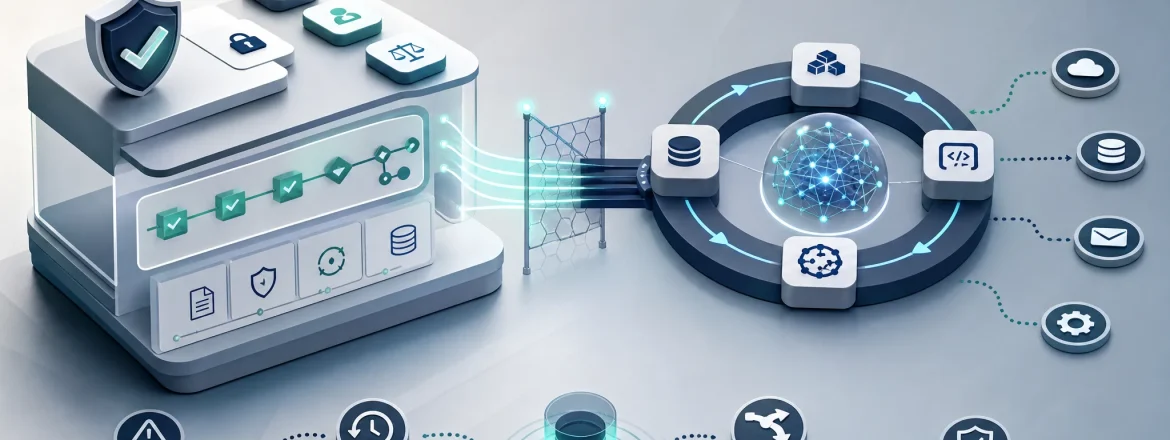
Short answer: In a control plane vs agent loop production architecture, the agent loop does bounded reasoning and proposes actions, while the control plane makes enforceable decisions—policy checks, approvals, routing, retry orchestration, audit/state recording, and recovery/containment.
If your agent can touch real systems (create tickets, update records, call APIs, send messages, deploy code, trigger jobs), you need runtime design that separates proposal from enforcement. This guide turns that boundary into a practical set of components, state transitions, and review checklists you can use with SRE, platform, and AI engineering teams.
Key takeaways (featured-snippet style)
- Control plane: enforce policy and decision rights (allowed/denied, when to run, how to recover, what to log).
- Agent loop: reason/plans/summarizes and generates proposals within constraints.
- Safety comes from runtime decisions, not from “the model being careful” or prompt-only rules.
- Auditable state matters: record proposal, policy decision, approvals, execution outcomes, and recovery.
- Retries and recovery are architectural controls—they must be idempotency-aware and failure-type-aware.
What “control plane vs agent loop” means
Short answer: The control plane vs agent loop split is a decision-rights boundary: the agent loop proposes what to do; the control plane decides what is permitted and orchestrates safe execution and recovery.
The simplest mental model is:
- The agent loop figures out the plan and next step candidates based on the task and context.
- The control plane determines whether an action can become real—based on policy, workflow rules, approvals, state, idempotency, and risk.
That distinction matters because production systems require decision rights, not just model intelligence. A model can be confident and still be wrong for policy, compliance, cost/security constraints, or operational safety.
In other words: once an agent can trigger side effects, prompt quality is no longer the main safety mechanism. The runtime boundary is.

Recommended image filename: control-plane-vs-agent-loop-architecture.svg
Recommended alt text: Control plane above agent loop showing policy, approvals, audit, retries, rollback/compensation, and state recording.
Why production agents need a runtime boundary
Short answer: If an agent can mutate state or trigger side effects, you must prevent “proposal becomes execution” unless the runtime can authorize, approve, retry safely, record what happened, and contain failures.
Production demos can look smooth because the happy path is forgiving: the model proposes a tool call, the tool returns data, and the agent seems intelligent.
The real problem begins when the same workflow can:
- Update business records
- Send emails/messages/slack notifications
- Create or modify tickets
- Deploy changes
- Trigger downstream jobs and workflows
Once those are in play, the system is no longer “generating text.” It is participating in operational change. That is exactly where the control plane vs agent loop boundary becomes practical, because it gives you deterministic, inspectable enforcement.
What you need from runtime design
When a workflow might have side effects, you should always be able to answer:
- Who is allowed to act?
- What can change?
- What needs approval (and who approves)?
- How does the workflow behave on failure?
- How do you reconstruct the full sequence later (audit/debug)?
- How do retries avoid duplicating side effects?
If those answers are unclear, the workflow is not yet a controllable system—even if it works as a demo.
Proposal vs enforcement: the core rule
Short answer: In a control plane vs agent loop system, the agent loop can propose candidates, but the control plane performs the permissioning and decides whether execution is allowed.
This isn’t just a philosophical split. It becomes operational when you implement a state model for every important action.
A simple state machine for one agent action
Short answer: Treat each externally meaningful action as a state machine: proposal → checks → approval (optional) → execution → recording → recovery.
A practical production lifecycle often looks like:
- Proposed (agent loop suggests an action + context)
- Policy checked (runtime evaluates allowed/denied)
- Approved or denied (human/external gate if required)
- Executed (executor performs side effect)
- Recorded (state + audit logs stored)
- Recovered (rollback/compensation/containment if needed)
This makes it easier to answer questions during incidents and audits:
- Which policy version applied?
- Was human review required?
- What exactly was executed (inputs and chosen path)?
- Did the action partially succeed?
- What recovery steps ran?
- Can you replay the decision and execution history from logs?
Note what this approach does: it forces the workflow to be honest about the steps between “the model had an idea” and “the system changed the world.”

Recommended image filename: production-agent-action-lifecycle.svg
Recommended alt text: Production agent action lifecycle from proposal to policy check, approval, execution, logging, and recovery.
What belongs in the control plane
Short answer: The control plane owns enforceable decisions, approvals, routing, retry orchestration, audit/state recording, and recovery/containment for externally visible actions.
A useful rule: if a decision changes whether an action is allowed, when it runs, how it retries, or how it recovers, that decision belongs in the control plane.
1) Policy enforcement (the runtime veto)
Short answer: Policy enforcement is the control-plane responsibility that evaluates and authorizes actions before side effects occur.
In practice, the control plane must be able to:
- Validate inputs (shape and constraints)
- Authorize based on roles/workflow rules
- Version policies so decisions remain explainable later
- Veto actions that are out of bounds, even if the model suggests them confidently
Policy should be explicit and reviewable. Prompts can guide behavior, but prompts are not a reliable enforcement boundary.
If you need an independent veto mechanism, you need a runtime policy layer.
2) Approval gates (traceable workflow states)
Short answer: When review is required, approvals must be explicit runtime states with a traceable outcome—not an instruction hidden in chat.
Good approvals have a workflow history you can inspect:
- Which proposal triggered approval
- Which policy evaluated the action
- Who approved (or denied)
- When approval occurred
- The outcome and any follow-up routing
This is critical for auditability. If approvals aren’t tied to the decision they represent, the approval step is operationally weak—even if the UI “looks right.”
If you want to go deeper, see Human Review in AI Workflows: When to Decide, Escalate, or Stop.
3) Routing and escalation (pause/continue/escalate/hand off)
Short answer: The control plane decides whether a workflow continues, pauses, escalates, or hands off when risk changes or context is missing.
Models can help identify ambiguity, but the runtime must own routing decisions:
- Continue when policy allows and state is consistent
- Pause when approvals/timeouts are required
- Escalate when risk thresholds are crossed
- Stop when safety constraints are violated
Escalation is especially important because risk can change mid-workflow due to:
- Missing context that later becomes necessary
- Conflicting data sources
- Repeated failures
- Policy exceptions that apply only after certain state is reached
That means routing isn’t only about the initial request—it’s about how risk evolves across state transitions.
4) Retry orchestration (idempotency and failure-type aware)
Short answer: The control plane owns retry logic so retries don’t duplicate side effects or worsen partial failures.
Blind retries are a common production failure mode for agentic systems. A retry can:
- Repeat an action that already partially succeeded
- Duplicate messages or downstream triggers
- Turn a transient outage into a persistent incident
A safe retry strategy typically requires:
- Failure classification: before execution vs during execution vs after partial side effects
- Idempotency awareness: whether the action can be repeated safely
- State awareness: whether the workflow already advanced to the next stage
- Risk awareness: whether repeating is acceptable under current policy
Not every failure should trigger a retry. Some failures require pause/escalation/stop instead.
5) State recording and audit logs (the “platform memory”)
Short answer: The control plane must record proposal, policy decisions, approvals, execution outcomes, and recovery steps to enable replay and debugging.
Without reconstructable history, you can’t reliably debug incidents, satisfy audit requirements, or improve the system.
Good recording usually includes:
- Original request context (as allowed by your privacy/security rules)
- Agent loop proposal (what action was suggested and why)
- Policy decision inputs and policy version
- Approval requirement and approval outcome
- Execution inputs and downstream effects (tool call parameters, correlation IDs)
- Failure type and recovery steps executed
- Final disposition (succeeded/denied/paused/stopped/contained)
In practice, “audit logging” is not a single log line. It’s a structured state trail that ties together intent → permission → action → outcome.
6) Rollback and compensation (know what’s possible)
Short answer: Rollback/compensation are recovery controls the control plane should plan and orchestrate explicitly—because not every action can be undone.
Production systems need to differentiate:
- Rollback: undo an action when the system supports it
- Compensation: counterbalance effects when true undo isn’t possible
Examples:
- If only a local database record changed and no external side effects escaped, rollback may be feasible.
- If you already sent an email, you likely can’t “unsend” it; compensation might mean sending a correction or opening a support workflow.
- If a deployment partially failed, compensation might involve rolling back the deployment or adjusting feature flags/traffic routing.
The control plane should select the recovery path before execution when possible, so recovery is deterministic and auditable.
7) Containment and rate limiting (prevent failure spread)
Short answer: The control plane contains failure by pausing workflows, limiting retries, isolating bad requests, and stopping unsafe error patterns.
Containment keeps partial failures from becoming broad operational incidents.
Common containment actions include:
- Pause a workflow after repeated failures
- Limit repeated execution attempts for the same action/correlation key
- Stop execution when error patterns look unsafe
- Isolate a “bad” request so it doesn’t poison broader throughput
Example: if the workflow repeatedly fails against the same tool due to a policy/validation issue, the runtime should stop trying and route the workflow to a safer next step rather than letting the agent keep suggesting retries.
What belongs in the agent loop
Short answer: The agent loop owns bounded reasoning: interpret context, plan steps, generate proposals, and choose among allowed next actions—without deciding permission or enforcement.
The control plane doesn’t remove the model from the workflow. It gives the model a bounded space where proposals are useful and safe.
Reasoning, planning, and task decomposition
Short answer: The agent loop should break the task into steps and propose candidate actions that are plausibly relevant to the goal.
This is where the model adds value: handling ambiguity, synthesizing context, and selecting among multiple possible approaches.
But the model must remain within bounds. It can ask internally “what is the next best step,” but it should not become the final authority on whether the step is allowed.
Proposal generation (what the model suggests to the control plane)
Short answer: A strong agent loop produces proposals that the control plane can evaluate deterministically.
Proposals should be structured enough for runtime evaluation. For example, a proposal can include:
- Intent summary (what the action would do)
- Target resource/domain (what it would affect)
- Requested tool/action and parameters
- Reasoning highlights (why this action fits the context)
- Risk-relevant context (if known)
Then the control plane evaluates permission, approvals, retry conditions, and state transitions.
If you want another framing of the decision-rights separation, read The Agent Loop Thinks. The Control Plane Decides.
Summarization and interpretation (language-heavy tasks)
Short answer: Interpretation can help the agent loop propose better options, but it does not grant permission.
The agent loop is well-suited to:
- Summarize long context
- Interpret ambiguous user intent
- Classify the incoming request into workflow categories
- Convert messy details into a tractable proposal
Even when the model is “right” about intent, the control plane still decides whether execution is permitted and safe.
Choosing among allowed actions (bounded autonomy)
Short answer: Inside a safe workflow, the agent loop can choose among multiple allowed options; the control plane defines the boundary of “allowed.”
This pattern preserves autonomy without letting the model define system authority.
For instance, if several tool calls are allowed and all are compliant, the agent loop can pick the best one for the current state. But if any action violates policy or requires approval, the control plane enforces the boundary.
To explore autonomy boundaries further, see Agent Autonomy Boundaries: Decide, Escalate, Stop, and Review.
Control plane vs agent loop: a practical comparison
Short answer: The control plane answers permissioning, safety, and operational behavior; the agent loop answers proposals and reasoning inside those constraints.
| Question | Control plane answer | Agent loop answer |
|---|---|---|
| Is this action allowed? | Yes/no based on policy + state | Propose the action, but do not decide permission |
| Does this require approval? | Yes/no based on workflow rules | Detect uncertainty and surface a proposal |
| Can we retry? | Only if failure type + idempotency + risk allow it | Suggest an alternative path after failure |
| What happened? | Record state transitions and decision outcomes | Summarize proposal and observed context (for humans/logs) |
| How do we recover? | Orchestrate rollback/compensation/containment | Assist with diagnosis and next-step suggestions |
Why prompt-only governance is not enough
Short answer: If the only thing preventing bad actions is prompt text, the system is fragile—because the runtime has no independent veto, no structured audit story, and no state-aware enforcement.
Prompt-only governance often fails in predictable ways:
- Policy is hidden in text instead of explicit runtime logic.
- The model becomes both advisor and enforcer.
- Auditability after the fact is weak (you can’t reliably prove the enforcement basis).
- The workflow blurs proposal vs execution decisions.
- The runtime has no independent “stop” when something looks unsafe.
This does not mean prompts are useless. Prompts are valuable for shaping reasoning and improving proposal quality. They just shouldn’t be the boundary that guarantees safety.
A production design uses prompts, policies, approvals, and runtime checks together: prompts help the model propose; the runtime decides whether proposals can become real.
A minimal control-plane architecture (you don’t need a giant platform)
Short answer: A minimal control plane can be implemented as a set of responsibilities: policy evaluation, approval gating, state storage, execution orchestration, recovery handling, and audit logging.
You can start with these roles:
- Policy evaluator
- Action router (continue/pause/escalate/stop)
- Approval gate (request/record/hold execution)
- Workflow state store (proposal → execution → recovery)
- Event log / audit log writer
- Execution executor
- Rollback/compensation handler
- Containment / rate limiter
These roles do not have to be separate products. They do have to have separate decision responsibilities.
The control plane typically owns the execution envelope, including input validation, authorization, rate limiting, retry policy, and error classification.
Example control flow (proposal → decision → execution → record)
proposal = agent_loop.propose(task_state)

decision = control_plane.evaluate(
  proposal,
  policy,
  risk,
  idempotency,
  approval_requirements,
  current_state
)

if decision.requires_approval:
    decision = control_plane.request_approval(decision)

if decision.allowed:
    result = executor.run(decision.action)
    control_plane.record(proposal, decision, result)

    if result.failed:
        control_plane.classify_failure(result)
        control_plane.compensate_or_rollback_if_possible(result)
        control_plane.record_recovery(result)
else:
    control_plane.record_denial_or_pause(proposal, decision)
The point is not elegance. The point is traceability: every important action stays correlated to a workflow instance, and every step is auditable.
How to design safe retries (step-by-step)
Short answer: Retry behavior should be chosen by the control plane based on failure type, idempotency, and current workflow state—not by a blind loop.
Use this step-by-step checklist:
- Classify the failure: did it occur before execution, during execution, or after partial side effects?
- Check idempotency: can the action be repeated without duplicating changes?
- Check state progression: has the workflow already advanced to a stage indicating success/partial success?
- Check policy constraints: does repeating the action still satisfy the current policy and risk posture?
- Decide the next step: retry, pause for approval, escalate, stop, or route to compensation.
- Record the decision: include retry reason, failure classification, and any containment action taken.
Key rule: if you can’t confidently avoid repeating unsafe side effects, default to conservative behavior (pause/stop/escalate) instead of retrying.
Concrete questions to ask during design reviews
- Was the failure before execution, during execution, or after partial side effects?
- Is the action idempotent (or can it be made idempotent with correlation keys)?
- Could a retry duplicate a message, update, or transaction?
- Should the workflow stop and wait for a human instead?
- Should the workflow route to compensation rather than retrying?
These questions belong in the control-plane design review, because the control plane can see workflow state and enforce consistent behavior across tool calls.
How to design rollback and compensation
Short answer: Rollback undoes when possible; compensation counterbalances when undo isn’t possible. The control plane should select and orchestrate recovery explicitly.
Here’s a table that helps you reason about recovery:
| Situation | Rollback feasible? | Typical recovery strategy |
|---|---|---|
| Local state change only | Often yes | Rollback (undo the record/state) |
| External message already sent | Often no | Compensation (send correction, open ticket, notify with explanation) |
| Deployment partially completed | Sometimes partial | Compensation (rollback deployment, adjust feature flags/traffic) |
| Multi-system side effects | Usually complicated | Containment + compensation steps per system + audit correlation IDs |
Design recovery at the same time you design the action. If you wait until after an incident to invent a recovery path, the system will be underdesigned from a safety perspective.
Human review and escalation: make it a first-class workflow state
Short answer: Human review is most effective when it’s explicit, bounded, and integrated into the workflow state machine—not an afterthought.
Common points to involve a human:
- When the model is uncertain and the action is high impact
- When policy requires sign-off before execution
- When the request crosses a risk threshold
- When the workflow is repeatedly failing
- When downstream system state looks inconsistent and recovery could be costly
For human review to work, reviewers must know:
- What is being requested
- Why it’s being escalated
- Which policy applies
- What happens if they approve vs deny
- What recovery steps are planned if execution fails
That’s why human review belongs in the control plane. The agent loop can prepare context and summaries, but it should not decide whether review is required.
For a dedicated guide, use Human Review in AI Workflows: When to Decide, Escalate, or Stop.
How to scale autonomy without losing control
Short answer: Scale autonomy through progressive permissioning: start small, add permission gates, and expand only when observability and recovery are proven.
A control plane does add coordination overhead. But the tradeoff should not be framed as speed vs safety. The real tradeoff is unbounded autonomy vs bounded autonomy with recovery paths.
A practical permissioning sequence:
- Start with read-only actions (minimal operational risk).
- Allow low-risk writes with strong audit logging and containment.
- Add approval gates for higher-risk actions.
- Expand permissions only after policy enforcement, observability, and recovery patterns are solid.
Safe autonomy tends to be “boring” in the best way: safe paths are easy, unsafe paths are difficult, policy is explicit, approvals are visible, recovery is designed, and audit is automatic.
Failure modes you should expect (and how the control plane responds)
Short answer: Name failure modes early, and design specific control-plane responses instead of relying on generic panic behavior.
Here are common failure modes:
| Failure mode | Why it matters | Control-plane response |
|---|---|---|
| Unsafe action proposed | The model can suggest something outside policy | Veto, pause, or downgrade execution |
| Approval missing | Side effects should not happen yet | Block execution and record the pause |
| Tool failure mid-action | Partial execution can leave state inconsistent | Classify failure and trigger recovery |
| Blind retry | Repeating the call can duplicate side effects | Retry only when idempotent and safe; otherwise pause/escalate/stop |
| Missing audit trail | You cannot reconstruct what happened later | Record proposal, decision, execution, and recovery |
| Repeated uncertainty | The workflow keeps bouncing without resolution | Escalate to a human or stop the workflow |
| Policy drift | Rules change but runtime doesn’t enforce versions correctly | Version policies and record which version made the decision |
That is why the control plane exists: it provides a disciplined place to respond to failure.
Observability and auditability: what to record (minimum viable)
Short answer: If a production agent can affect real systems, observability is mandatory. The control plane should make it possible to reconstruct what happened, why it happened, and what recovery was executed.
At a minimum, you should be able to reconstruct:
- The original request (as permitted by your governance/privacy rules)
- The agent proposal(s)
- The policy version used for each decision
- Whether approval was required
- Who approved or denied the action (if applicable)
- What executed in downstream systems (correlation IDs + parameters)
- What failed (including failure classification)
- What recovery path ran
- The final outcome (succeeded/denied/paused/stopped/contained)
Auditability also matters for normal operations, not just incidents. It supports:
- Debugging and regression analysis
- Compliance review and policy governance
- System improvement by identifying recurring weak spots
Good observability also makes unsafe repetition visible. If the same action keeps failing, the platform should show the pattern before it becomes a broader problem.
How to structure workflow state (so it’s replayable)
Short answer: Workflow state is the backbone of the control plane. It should make transitions from proposal → execution → recovery explicit and stored.
You don’t need an overly complex state graph on day one, but you do need a state model that captures the important phases.
A practical state model often includes fields like:
- workflow ID
- request source
- agent proposal (intent + action candidates + parameters)
- policy version
- approval requirement
- approval outcome
- execution status
- retry count and retry decisions
- failure classification
- recovery status
- final disposition
- correlation IDs for downstream effects
With those fields, the control plane can make consistent decisions across steps, and you can replay/inspect decisions and outcomes.
A key anti-pattern is treating state as an implicit side effect of tool calls. Explicit state is what makes the workflow inspectable and reliable.
Comparing simpler alternatives (when you may not need a full control plane)
Short answer: Not every workflow needs a separate control plane. The pattern is most valuable when the cost of failure is higher than the cost of runtime complexity.
Here are options and tradeoffs:
| Option | Good for | Weakness |
|---|---|---|
| Prompt-only rules | Low-risk, short-lived workflows | Fragile enforcement and weak auditability |
| Hard-coded workflow | Narrow, well-understood tasks | Can become rigid when the task evolves |
| Separate control plane | Stateful, risky, externally visible actions | More orchestration and operational complexity |
A practical heuristic: if an action is low risk and easily reversible, you can start lighter. If it can create real operational damage or has expensive recovery, a control plane boundary becomes worth it.
Common anti-patterns (things that prevent “real” control)
Short answer: Avoid anti-patterns where the model becomes the gatekeeper, policy is hidden in prompts, or retries/approvals lack stateful enforcement and traceability.
Anti-pattern: letting the model approve itself
If the model is the only thing deciding whether its own action should run, there is no independent control. This design is easy to build and hard to trust.
Anti-pattern: hiding policy inside prompts
Policy inside prompts is hard to version, test, and audit. A runtime policy layer gives you better control.
Anti-pattern: retrying without idempotency checks
Retrying a side-effecting action without idempotency checks can repeat the same change more than once. That turns transient issues into real incidents.
Anti-pattern: treating approval as an informal suggestion
If approval is required, it needs to be a workflow state with a traceable result. A casual chat instruction is not enough.
Anti-pattern: designing recovery only after failure
Recovery should be designed before the system is trusted. If you wait until an outage, the system is already underdesigned.
Anti-pattern: confusing reasoning with authorization
The agent loop may understand the situation, but understanding is not permission. Authorization must belong to the control plane.
A practical architecture review checklist
Short answer: Use this checklist to verify that your system truly implements a control plane vs agent loop boundary with decision rights and auditability.
- Does the runtime own policy enforcement, or is policy only in prompts?
- Are approvals explicit workflow states with traceable outcomes?
- Can the system pause, route, or escalate when risk changes?
- Are retries aware of idempotency and failure type?
- Can you reconstruct intent, decision, execution, and recovery from logs/state?
- Is rollback or compensation part of the workflow design?
- Can the runtime contain failures before they spread downstream?
- Are safe actions easy and unsafe actions difficult?
- Can the control plane veto an action proposed by the agent loop?
- Does every important side effect map to a workflow state?
If most answers are “no,” you probably have prompts plus tools, not a real control plane yet.
How to evaluate an agentic system before production
Short answer: Test normal and failure scenarios: allowed actions, denied actions, approval pauses/timeouts, tool failures, retry limits, and recovery paths.
Happy-path demos aren’t enough. Before trusting a production agent, exercise:
- An allowed action that succeeds cleanly
- A denied action that the runtime blocks
- An approval-required action that pauses correctly
- A tool failure that triggers recovery logic
- A partial execution that requires containment or compensation
- A repeated failure that should stop rather than loop forever
You’re looking for predictability under stress. That matters more than whether the model sounded convincing in a demo.
When teams need “metrics,” prefer metrics that reveal control quality, such as:
- Policy violation rate (how often actions are vetoed/blocked)
- Approval rate (how often actions require review)
- Rollback/compensation rate (how often recovery paths are used)
- Unsafe retry rate (how often the system retries incorrectly)
- Audit-log completeness (does logging cover the critical states?)
- Time to contain failures (operational containment responsiveness)
These are design recommendations rather than universal benchmarks. The “right” measurements depend on workflow risk profile and operational goals.
If you’re building a testing strategy, consider Agent Eval Harness: How to Build One That Survives Workflow Drift.
Cost-aware and operational review (keeping the control plane practical)
Short answer: Control-plane safety often increases orchestration work. To keep it practical, review where cloud economics and operational constraints belong in the design.
Some control-plane decisions (logging volume, retry strategy, approval latency, state retention) can influence cost and throughput.
For teams doing architectural reviews, it helps to add a structured “cost-aware” lens to the control-plane design review.
Related reading:
- Cloud Economics in Architecture Review: A Practical Framework for Cost-Aware Design
- Cost-Aware Architecture Review: Where Cloud Economics Belongs in System Design
- Cloud Economics During a Platform Hiring Gap: Keep Cost Decisions in the Engineering Loop
Where teams get stuck: the “agent loop ceiling”
Short answer: Some teams try to solve safety by increasing prompt/tool complexity instead of implementing enforcement boundaries. That hits an “agent loop ceiling.”
If your architecture relies on more prompt instructions and a longer while-loop to “handle everything,” you’ll eventually run into operational limits: inconsistent behavior, weak enforcement, and hard-to-debug retries/recovery.
When you see those patterns, revisit the decision-rights boundary and strengthen the control plane vs agent loop responsibilities. (For more on the limits of agent loops, see The Agent Loop Ceiling: When LLM Agents Need More Than a Prompt, Tools, and a While Loop.)
Practical example: bounded workflow instead of full autonomy
Short answer: Not every business use case needs a fully autonomous agent. Sometimes a bounded workflow with a control plane is safer and more predictable.
For example, AI support triage can be designed as a bounded workflow (routing + decisions + audit) rather than a free-running agent that invents actions.
Related reading: AI support triage should be a bounded workflow, not an autonomous agent.
Image metadata recommendations (aligned to the two diagrams in this article)
Short answer: Ensure your diagram filenames, alt text, and captions match the control plane vs agent loop topic and are accessible for readers and AI systems.
- Diagram 1 filename: control-plane-vs-agent-loop-architecture.svg
- Diagram 1 alt text: Control plane above agent loop showing policy, approvals, audit, retries, rollback/compensation, and state recording in production agent workflows.
- Diagram 1 caption: The control plane owns deterministic enforcement and recovery; the agent loop owns bounded reasoning and action proposals.
- Diagram 2 filename: production-agent-action-lifecycle.svg
- Diagram 2 alt text: Production agent action lifecycle showing proposal, policy check, approval gate, execution, state recording, and recovery/rollback or compensation steps.
- Diagram 2 caption: A production agent action should move through explicit runtime states instead of a hidden side effect.
Frequently asked questions
What is the control plane vs agent loop pattern?
The control plane vs agent loop pattern is a production architecture that separates reasoning from enforcement. The agent loop generates proposals and plans. The control plane enforces policy, handles approvals, orchestrates retries, records state for auditability, and contains failures through deterministic recovery logic.
Why is the control plane important for agentic systems?
Because once an agent can change state or trigger side effects, the runtime needs independent control over what is allowed, what requires approval, how retries behave, and how failures are recovered. Without that layer, safety depends too heavily on prompt instructions and model behavior.
Can the agent loop ever make policy decisions?
The agent loop can help interpret context and propose likely actions, but the final permission decision should belong to the runtime/control plane. In risky or externally visible workflows, the control plane should have the last word.
What exactly should the control plane own?
Typically: policy evaluation, approval gates, routing/escalation/stop decisions, retry orchestration, structured state recording and audit logs, rollback or compensation handling, and failure containment/rate limiting.
What exactly should the agent loop own?
Typically: bounded reasoning, task decomposition, summarization, interpreting ambiguous intent, and proposal generation. It can choose among allowed actions inside the envelope defined by the control plane.
Do all agentic workflows need a separate control plane?
No. Low-risk, read-only, or easily reversible workflows may be able to start with lighter orchestration. However, the more stateful, sensitive, externally visible, or costly a workflow is to recover, the more valuable the control plane becomes.
How do approvals fit into the architecture?
Approvals should be explicit workflow states. The control plane should request, record, and enforce the approval requirements. They should not exist only as prompt instructions or chat messages.
What’s the biggest mistake teams make?
A common mistake is letting the model act as both the reasoner and the gatekeeper. That blends proposal and authorization into the same layer and makes the system hard to trust and hard to audit.
How should retries be handled safely?
Retries should be decided by the control plane using failure classification, idempotency awareness, and workflow state. A blind retry loop can duplicate side effects or worsen partial failures.
How can I tell if I really have a control plane?
You likely have a real control plane if the runtime can veto actions based on policy, require/record approvals, manage retries with idempotency and failure-type awareness, record reconstructable audit state, contain unsafe failure patterns, and orchestrate recovery without relying on the model to enforce safety.
Conclusion: make the boundary real
Short answer: In a safe control plane vs agent loop production architecture, the agent loop thinks and proposes, while the control plane decides what is allowed to happen—then records and recovers deterministically.
If an agent can mutate state, call tools, or trigger downstream actions, prompt quality is only part of the safety story. The production responsibility belongs to the runtime boundary:
- Control plane: policy enforcement, approval gates, retry orchestration, audit/state recording, recovery, and containment.
- Agent loop: reasoning within bounds, proposal generation, and constrained selection among allowed options.
That design produces bounded autonomy with recovery paths. It makes the workflow auditable, easier to debug, and safer to evolve over time.
In other words: the agent loop thinks, and the control plane decides.